




The ESIC IP number is a unique 10-digit identification code assigned by the Employee State Insurance Corporation (ESIC) to individuals and entities registered under the ESI scheme. Often referred to simply as the ESIC number, it plays a critical role in availing ESI services. This identifier helps both employers and employees to keep a proper record of the contributions and check coverage status. This guide describes various methods to find your ESIC IP Number online, including using your Aadhaar details and the UMANG app for quick lookup, so you can verify your status anytime, anywhere.
Key Takeaways
- The ESIC IP Number is a 10-digit lifelong identifier issued to each insured employee. A 17-digit code is issued to the ESIC employer for the establishment.
- The ESI benefits are applied to employees earning up to ₹21,000/month, with contributions divided as 0.75% (employee) and 3.25% (employer).
- The ESIC IP Number offers access to medical facilities, hospital services, and cash benefits like sickness and maternity pay.
- The ESIC number can be checked online on the ESIC portal, UMANG app, Pehchan card, salary slips, or payroll records. If lost, it can be retrieved via the portal’s Aadhaar lookup, UMANG app, HR department, and ESIC customer care.
What is an ESIC Number?
ESIC number refers to two different identifiers within the ESI compliance framework: the employer code and the employee IP number. They serve separate functions in the system.
ESIC Employer Code (17-Digit)
The employer is given a permanent, non-transferable 17-digit code when their establishment gets registered. The ESIC employer code follows the format with 5 segments: XX-XX-XXXXXX-XXX-XXXX. Where:
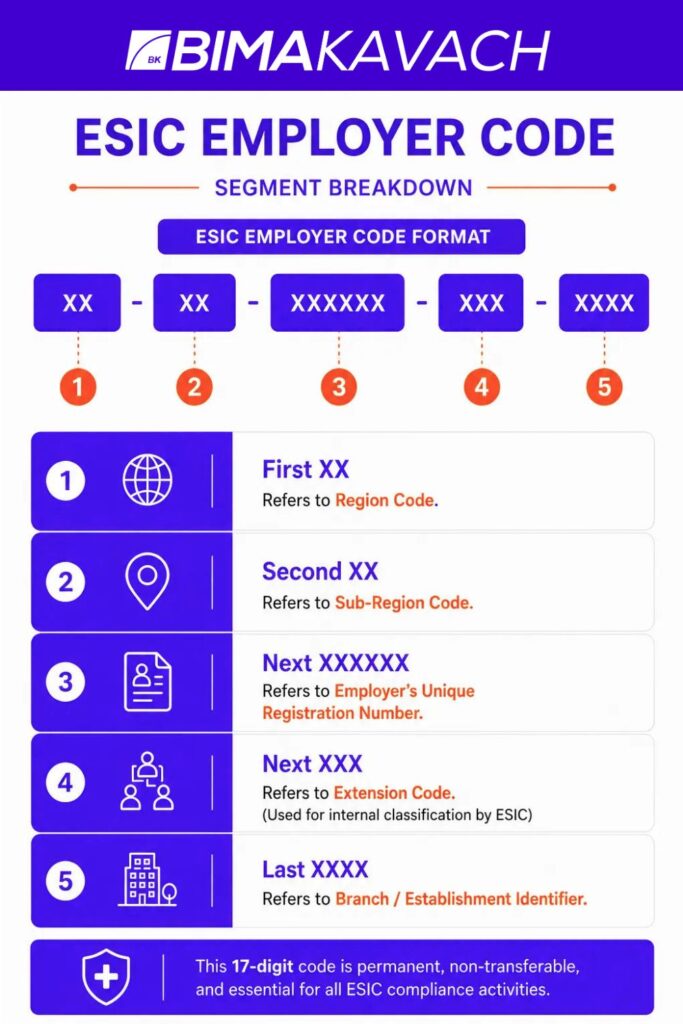
- The first 2 digits represent the state/ region where the employee’s establishment is registered.
- The next 2 digits stand for the sub-region code
- The next 6 digits represent the unique registration number assigned to the specific business
- The next 3 digits denote the extension code.
- The final 4 digits denote the branch/establishment identifier.
HR teams use this code every month to file contributions, enroll employees, and submit returns.
ESIC IP Number (10-Digit)
The IP number in ESIC is a 10-digit code allocated to each insured employee. Unlike the employer code, the IP number remains with the employee for life, even if he/she changes jobs. Digits 1-2 indicate the regional office, digits 3-4 represent the sub-regional branch, and digits 5-10 are a sequential identifier unique to that branch.
Example: 3101234567.
Employer Code vs IP Number
| Feature | Employer Code | IP Number |
| Digits | 17 | 10 |
| Who Gets It | Establishment | Individual employee |
| Where to Find | Registration certificate, ESIC portal | Pehchan card, payslip, ESIC portal |
| Portable? | No, tied to the establishment | Yes, lifelong across employers |
ESI coverage applies to establishments with 10 or more employees. The employee’s monthly wage limit should not exceed ₹21,000/month. For persons with disabilities, the wage limit has been relaxed to ₹25,000. The entire contribution of 4% is divided as employee (0. 75%) and employer (3. 25%). If you are running a business that comes under these criteria but you are not registered yet, it’s worth understanding the ESIC registration process before the next payroll cycle begins.
How to Check Your ESIC IP Number Online
Your ESIC IP Number may be needed at any time for various purposes, such as return filing, new employee onboarding, or query resolution, and knowing how to check online can save valuable time. There are several trustworthy ways to perform an ESIC IP number check online, depending on whether you are an employer or an employee.
For Employers (Finding Your 17-Digit Code)
- Log in to the ESIC Employer Portal using your registered credentials.
- Navigate to your dashboard, where the 17-digit employer code is displayed under profile and registration details.
- Alternatively, refer to your ESIC Registration Certificate, issued at enrollment, which lists the code as the primary reference.
- You can also cross-check the code on monthly ESI challans or within your payroll/HRMS software, where it’s stored as a mandatory field.
For Employees (Finding Your ESIC IP Number)
ESIC Portal
- Visit the ESIS Portal (esic.gov.in) and select Insured Person Login.
- Click on “Know Your IP Number.”
- Enter your Aadhaar or PAN details.
- Verify via OTP to view your 10-digit IP number on the screen.
UMANG App
- Download the UMANG app and register using your mobile number.
- Within the app, search for “ESIC”.
- Select Employee Centric Services
- View IP Details.
- Enter your UAN or registered mobile number
- Verify via OTP to retrieve your number.
Pehchan Card / e-Pehchan
Your physical Pehchan card has your IP number written on it. You can use a downloaded version of the e-Pehchan card if your physical card hasn’t arrived yet. Also, you can use your Temporary Identity Card (TIC) issued at registration until the permanent card reaches you.
Salary Slip
Many payslip formats include the employee’s ESIC IP number alongside ESI deduction details. This is a quick reference point if other channels are not accessible.
HR Department
Your employer’s HR or payroll team is legally obligated to keep and share your ESIC IP number upon request.
How to Download Your ESIC e-Pehchan Card Online
Once you know your ESIC IP number, downloading the actual e-Pehchan card is a separate step from just checking it. Here is how to get the PDF, whether you have your mobile number handy or only your Aadhaar details.
Download ESIC Card Using Your Mobile Number
- Install the UMANG app and register using your mobile number.
- Verify via OTP and set your MPIN.
- Search for “ESIC” inside the app and select Download e-Pehchan Card under Employee Centric Services.
- Enter your ESIC IP number along with the mobile number registered with your ESIC profile.
- Verify the OTP sent to your mobile.
- Download the e-Pehchan card as a PDF, then save or print it.
If the OTP does not arrive, your registered mobile number may be outdated in ESIC’s records. Ask your HR team to update it before trying again.
Download ESIC Card Using Your Aadhaar Number
The ESIC portal does not offer a direct “enter Aadhaar, get card” option. Aadhaar is used to retrieve your IP number first, and the card is downloaded using that number:
- Go to the ESIC portal, select Insured Person Login, then click “Know Your IP Number.”
- Enter your Aadhaar details and verify via OTP to view your 10-digit IP number.
- Log in to the Insured Person portal (or UMANG app) using that IP number with your password or mobile OTP.
- Open the e-Pehchan Card section and download the card as a PDF.
Keep a copy of the downloaded PDF on your phone or computer, and print it before visiting an ESIC hospital or dispensary, since most centres still ask for a physical copy.
Benefits Linked to Your ESIC IP Number
Your ESIC IP Number is much more than just an identification code. It is the main tool that enables you to avail of all the benefits that the ESI scheme offers. The moment your number is active in the system, it links you to both medical and cash benefits provided through ESIC.
Medical Benefits
- Complete coverage of OPD consultations and diagnostic tests carried out at ESIC dispensaries and hospitals.
- Inpatient treatment, including surgeries and associated pre- and post-hospitalisation care.
- Access to super-specialty treatment at ESIC network hospitals for complex conditions.
- There is no limit on medical expenditure, and the coverage extends to your dependents, too.
Cash Benefits
| Benefit Type | Rate/Amount | Duration |
| Sickness Benefit | 70% of wages | Up to 91 days/year |
| Extended Sickness Benefit | 80% of wages | Up to 2 years, for specified conditions |
| Maternity Benefit | full wages | 26 weeks |
| Disablement Benefit | 90% of wages | As per disability assessment |
| Dependants’ Benefit | 90% of wages | Paid to eligible dependents |
| Funeral Expenses | ₹15,000 | One-time payment |
ESIC Customer Care
Suppose your ESIC IP number is not working smoothly, or you are having technical issues with your ESIC number. In such cases, you may consider reaching out to your local ESIC office in person or contacting the ESIC customer care through these toll-free numbers.
- For general guidance regarding ESIC, you can dial 1800-11-2526.
- For the medical helpline, call 1800-11-3839.
Postal address of the head office for any official communication: Panchdeep Bhawan, CIG Marg, New Delhi, 110002.
Why Your ESIC Number Matters for Business
Compliance officers treat the ESIC number with the same seriousness as a GST registration or PAN, since the entire ESI compliance system depends on it. Here’s why it matters operationally:
- Statutory Filing: For filing ESI monthly contributions, the ESIC employer code is a must for employers. Without this number, filings will not be processed.
- Onboarding of Employees: The employer has to register new eligible employees with the help of the employer’s ESIC number on the ESIC portal. After this, only the employee’s ESIC IP number will be generated.
- Audit and Inspection Readiness: Labour inspectors will check the availability of the ESIC number during their inspections or audits. If this number is not available, it will be considered a violation.
- Submission of Half-Yearly Returns: ESIC rules mandate the submission of half-yearly returns. The ESIC employer number must appear in every return.
How to Retrieve a Lost ESIC IP Number
Losing an ESIC IP Number is quite common, especially when HR staff changes or an employee leaves. Here’s what you can do to get it back through proper channels.
For Employers
- Log in to the ESIC portal and click on the “Forgot ESIC Code” option.
- Provide your registered business details and verify through OTP for instant retrieval of the code.
- In case the online recovery is not successful, go to the nearest ESIC regional /branch office with your original registration documents.
- Ask the on-duty ESIC officer to carry out a manual code search.
For Employees
- Get in touch with your employer’s HR team, because they have the records related to your ESIC IP Number.
- If employment has ended or HR is unresponsive, visit your nearest ESIC branch office with valid proof of employment (offer letter, salary slips, or Form 16).
- Alternatively, use the UMANG app’s IP details lookup with your registered mobile number.
- Try the ESIC portal’s Aadhaar-based recovery option under Insured Person Login.
For unresolved cases, escalate to ESIC customer care at the toll-free helpline 1800-11-2526, available during regular working hours, for direct assistance without an office visit.
How BimaKavach Helps with Employee Insurance Compliance
ESIC handles statutory coverage for eligible employees. But every employer needs to go beyond it to fully safeguard the workforce. BimaKavach is a platform that helps businesses identify and manage the required insurance coverage to complement their ESI obligations.
- Employees earning more than ₹21,000/month are not covered under ESI. To protect them, employers need Workmen Compensation Insurance.
- If you need health coverage that extends to more than just the ESIC services, consider Group Health Insurance to cover your entire team.
- You can add an extra layer of protection with Group Personal Accident Insurance for risks related to your workplace.
Final Thoughts
Whether it’s the 17-digit employer code or the 10-digit ESIC IP Number, getting your ESIC number right ensures compliance and keeps your payments and employee benefits on track. If you haven’t yet registered, start with our ESIC registration process guide. And for the insurance gaps that ESIC doesn’t cover, you may get in touch with the seasoned experts at BimaKavach.
FAQs About ESIC IP Number
Yes. Log in to the ESIC portal, click on “Know Your IP Number,” fill in your Aadhaar details, and verify the same through OTP to view your 10-digit IP number instantly.
You can use the UMANG app or the ESIC portal. Enter your registered mobile number, verify through OTP, and your ESIC IP number will be shown on the screen.
No. The employer code is a 17-digit number assigned to the establishment. On the other hand, the ESIC IP number is a unique 10-digit code assigned to every individual employee.
No. The ESIC IP number is lifelong and transferable across employers. Your new employer just needs to add your existing IP number to their employee roll.
The maximum salary limit for ESIC coverage for employees is up to a monthly wage of ₹21,000. However, for persons with disabilities, it is kept at ₹25,000 per month.
Employees need to contribute 0.75% of gross wages, and employers need to contribute 3.25%. This brings the total contribution to 4% of gross wages under the ESI scheme.
No. The ESIC IP number is mandatory for all benefit claims, hospital access, and the generation of the Pehchan card under the ESI scheme.
For general guidance regarding ESIC, you can call 1800-11-3839. If you are facing issues with the application process, call 1800-11-2526. Both helplines are toll-free, but only available during working hours.